The Problem
Door-knocking is the single most effective thing a campaign does to reach voters. It's also the most logistically complicated.
When we were running our campaign, we learned firsthand how much time it takes preparing to do the most rewarding part of campaigning: talking to voters. Our campaign manager spent hours building walk routes manually. Mobile-unfriendly PDFs got texted to volunteers, who got lost looking up addresses. Paper walk lists came back illegible, making it hard to log our data. Volunteers knocked the same doors twice, annoying constituents, or skipped doors by accident. Every part of that workflow was friction - not because we were doing anything wrong, but because the tools weren't built for how campaigns actually operate. And that's the real problem.
You're a campaign, not a logistics company. But you're spending campaign hours on logistics.
The Product
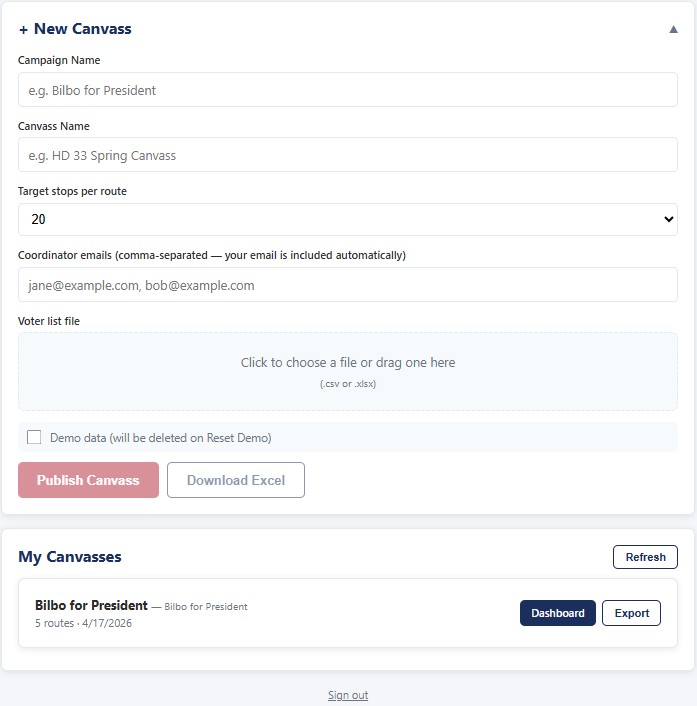
We built Flip to reinvent the canvass workflow, from voter list to data export, with a single web app. No downloads, all intuitive.
- Upload your voter list. Flip geocodes every address, groups voters by household for maximum efficiency, and clusters them into optimized walking routes.
- Distribute. Your coordinator logs in and sees every route on a live dashboard. Text a link to a specific volunteer, or send volunteers to a self-serve page where they pick the route that's right for them by time or location. Volunteers can seamlessly switch between Flip online and paper walk sheets with QR codes.
- Canvass. Volunteers tap the link on their phone. Google Maps opens automatically. At each address they see registered voters along with their party and demographics, and tap one of six interaction outcomes. Note yard sign requests and literature drops with a single checkbox.
- Export. One click. Clean spreadsheet with every contact, every outcome, every voter - ready for VAN, NGP, or whatever your campaign uses.
What Your Team Sees
The Campaign Coordinator
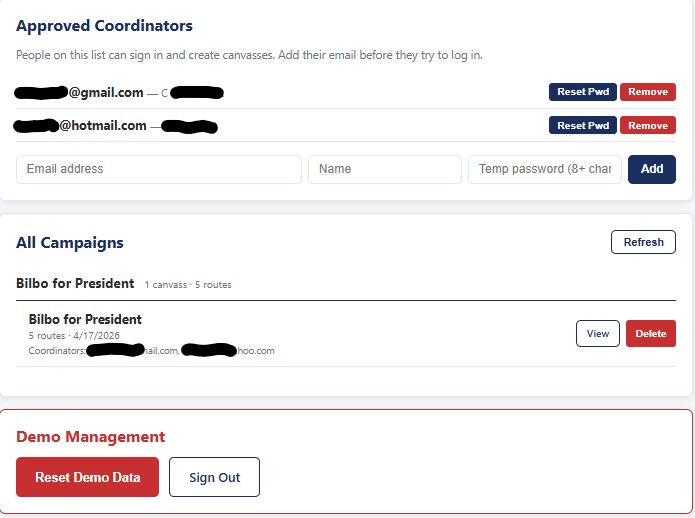
Coordinators log in with their own account and see every canvass they manage. The live dashboard shows route cards with color-coded status - Available, Claimed, In Progress, Complete- volunteer names, progress bars, and estimated completion time per route. If a volunteer drops halfway, the next person picks up with already-knocked doors marked done. One click exports results as an Excel file. Assign routes directly or share a self-serve link and let volunteers claim routes from a district map on their own.
The Volunteer
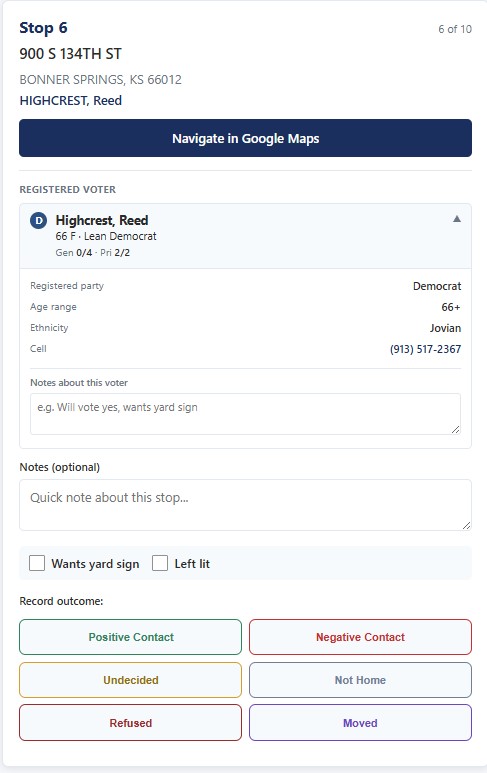
To begin, the volunteer taps the link sent to them or picks a route from the self-serve map. They see the current stop: the address, who lives there with their party affiliation and voting history, and a "Navigate in Google Maps" button. Knock the door, connect with voters, then record the interaction by tapping one of six outcome buttons. Check "yard sign" or "left lit" if applicable, and there's a space for notes. Everything in Flip online can also be done on paper, with seamless transition via QR code.
The Data
Every contact captured with timestamp, volunteer name and email, voter-specific notes, and interaction outcome. Export is one row per voter - nothing gets lost, nothing needs retyping.
What Volunteers See at Each Door
For each household, the volunteer sees:
- Who lives here- "JOHNSON, Amy, Carl" - surname and each registered voter's first name
- Per-voter detail- party (R/D/U), modeled party ("Lean Democrat", "Swing", "Strong Republican"), age and sex, voting frequency in general and primary elections
- Tap-to-expand extras- ethnicity, phone numbers with one-tap calling, private notes field per voter
- One button to Google Maps- turn-by-turn directions to this specific door
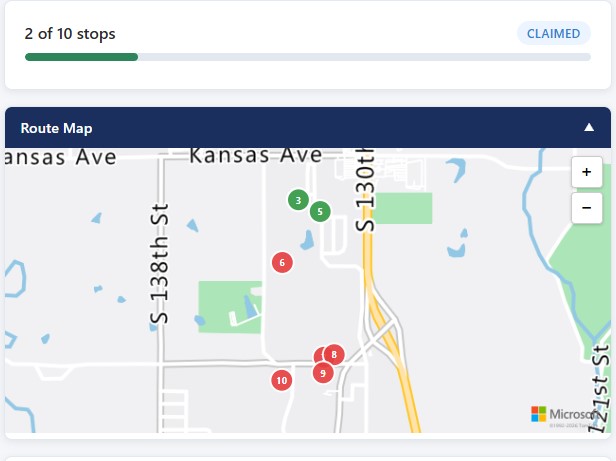
- Interactive route map- see all stops as numbered pins on a real street map. Tap a pin to jump to that stop. Pins turn green as you work to show your progress. Pinch to zoom, one-finger to pan.
- Yard sign + left lit checkboxes- one tap to flag a household that wants a sign or received literature. Both export to your spreadsheet.
- Two levels of notes- household notes and per-voter notes. Both auto-save and export.
Your canvasser walks up knowing who in the house voted in the last four primaries, and whether the voter who answers is a swing voter versus a lifelong partisan. Knowing your constituents leads to the right conversation with the right person.
Self-Serve Distribution
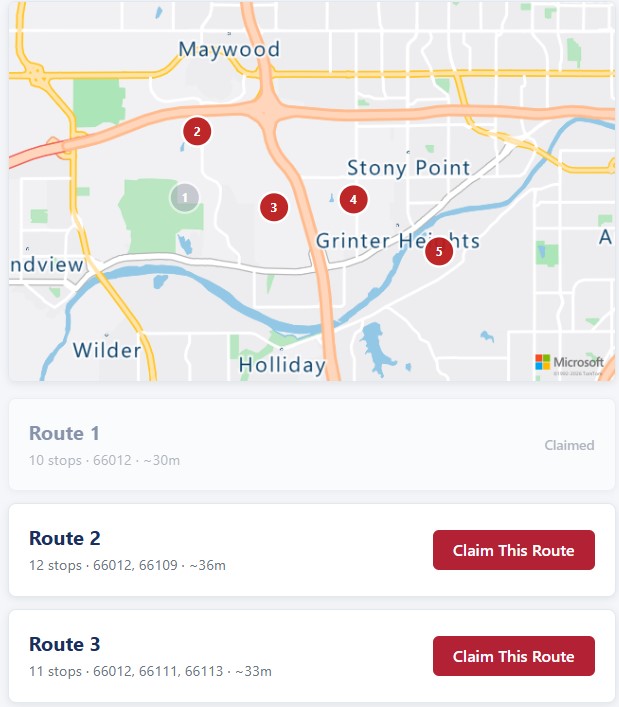
Don't have time to assign every route individually? Share one link to your volunteer group. They see a district map with numbered routes and pick the one most convenient for them. Each route shows its stop count and estimated time. Claimed routes go gray so there's no double-claiming.
The Walk Sheet: For Paper-First Volunteers
Not every volunteer canvasses off a phone. For older volunteers, rural areas with spotty service, or phones with short battery life, paper can be the best option.
Flip includes a one-page walk sheet per route that prints cleanly:
- Left column: address, household members with party, age, sex, voting history
- Right column: checkbox grid for all outcomes plus notes space
- QR code at the top- a volunteer who starts on paper can scan to flip to digital mid-shift
When the paper walk sheets come back, the coordinator scans the QR code on their phone to open the route and taps in outcomes digitally. No retyping addresses. Coming soon: Walk Sheet Scan- photograph the completed sheet and Flip reads the checkboxes automatically.
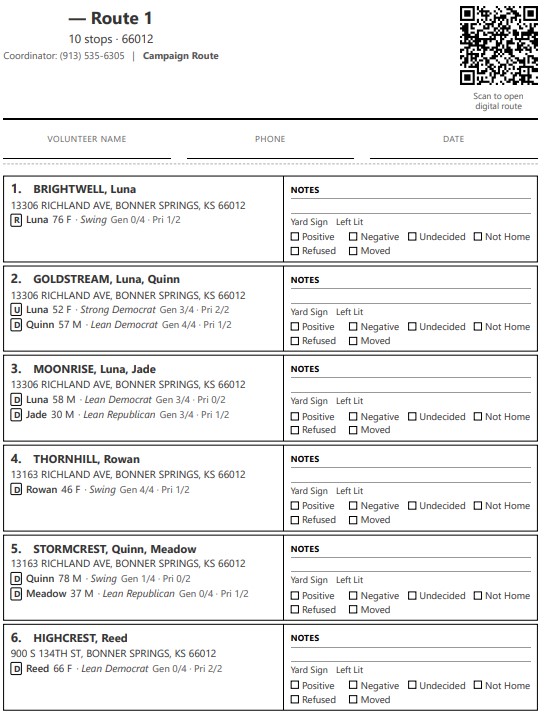
One product. Two modes. Paper and digital data ends up in the same export.
What It Replaces
| Today | With Flip |
|---|---|
| Field director in a spreadsheet for 2 hours | Upload your list - routes generate in under a minute |
| PDFs of walk lists texted around | One link per volunteer - or self-serve from a map |
| Paper tallies on clipboards | One tap per door (or a printable walk sheet with QR) |
| Sunday night data entry | Download Excel, done |
| Volunteers knocking the same door twice | Each door knocked once - households are grouped automatically |
| "Who's working Route 4?" | Dashboard shows every route, volunteer, and status - live |
| "What did Mary say about the bond?" | Per-voter notes, saved the moment they're typed |
| "Where am I in the route?" | Numbered pins on a street map - tap any to jump to that stop |
| "Does this house want a yard sign?" | One-tap checkbox - exports with the rest of the results |
| Retyping paper walk sheet results | Scan QR, enter digitally. Photo-scan coming soon. |
| Volunteers' phones dying mid-shift | A web page, not an app - no GPS drain, no background sync |
Your Volunteers' Phones Will Survive the Day
If your team has used canvassing apps before, you've heard the same complaint: the app kills their phone. Apps suck battery quickly, and phones plugged into a car charger to compensate will overheat.
Traditional canvassing apps track volunteer location every few seconds, draw maps continuously, and constantly sync data back to servers. The GPS chip never sleeps.
Flip doesn't need to do any of that.
- Walking to a door: Google Maps, the most battery-optimized mapping software available, handles navigation.
- At a door: Flip sits idle - no tracking, no drawing, no syncing.
- Recording an outcome: One short message to the cloud - a few hundred characters - then sleeps again.
Across a 20-stop shift, Flip sends about as much data as loading a single Instagram image. Your volunteers can canvass a full shift with cool phones in their pockets and plenty of battery left for the ride home.
Why It Works
Flip was built for the Kansas HD 33 race in 2026. The door-knocking model isn't a theory - it's been run against real voter lists, by real canvassers, on real phones. Designed around how campaigns actually operate, not how software companies think they do.
Flip uses cloud infrastructure on Microsoft Azure. Voter data stays in your tenant with HTTPS end to end. Volunteer phones don't store anything - close the tab and it's gone.
"[Flip's] routing program brought incredible efficiency to our volunteer team this morning. In about 6 hours in the rain, 12 volunteers placed over 300 yard signs across Kansas House District 33."
- KS HD 33 Carolyn Caiharr campaign
What It Costs
Pricing in development. Early partners get launch pricing locked in.
- Per-campaign pricing for one-off races
- Monthly subscription for consulting firms running multiple campaigns
- Free trial on your first canvass day - your real voter list, your real volunteers
Compare against: two hours of a field director's time, a Saturday of volunteer friction, or a door double-knocked that hurt your brand.
Frequently Asked
Coming Soon
Flip is a platform, not just a canvassing tool. Three features in development:
- Yard Sign Routing- automatically generate sign placement and pickup routes from canvass data. Learn more →
- Phone Bank- run call lists the same way you run door canvasses. Tap-to-call, outcomes recorded, results exported. Learn more →
- Walk Sheet Scan- photograph completed paper walk sheets and Flip reads the checkboxes automatically. Confidence-gated review catches anything uncertain before it hits the database. Learn more →